
Convert images between JPG, PNG and WebP
Change the format of one image or many: JPG for photos, PNG for screenshots and transparency, WebP for small files on the web.
Your image will be processed on this device.
How to convert images between JPG, PNG and WebP
- Select or drop one or more images.
- Choose the format to convert to.
- Select Convert and download the images, or all of them as a ZIP.
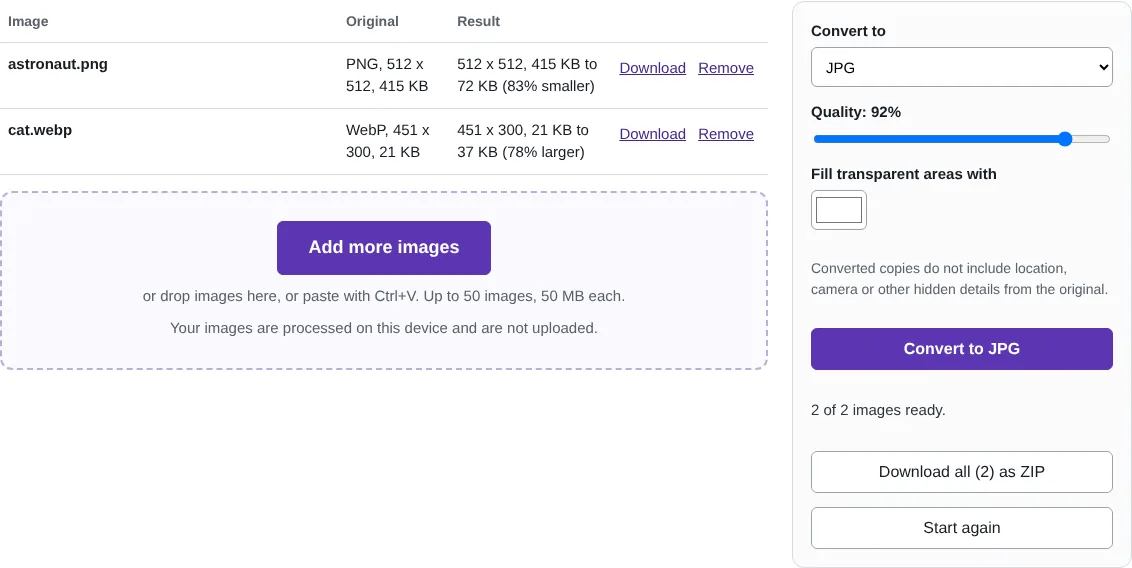
Worked example: a PNG photo and a WebP image to JPG
In this test we converted two files to JPG at 92% quality: a 512 x 512 PNG portrait of 415 KB and a 451 x 300 WebP photo of a cat of 21 KB. The PNG became a 72 KB JPG, 83% smaller. The WebP became a 37 KB JPG, larger than the WebP, because WebP compresses photos more efficiently than JPG. Download all saved both in converted-to-jpg.zip.
Formats this converter opens and saves
It opens JPG, PNG, WebP, GIF and BMP files, and AVIF in browsers that can display it. It saves JPG, PNG and WebP. It also opens HEIC photos from iPhones: they are decoded on your device, and HEIC to JPG has more about them.
Converting changes how the picture is stored, not what it shows. Converting a JPG to PNG does not bring back detail that JPG compression removed, and converting a PNG to JPG fills any transparent areas with the colour you choose.
Converting many images at once
Select up to 50 images, in any mix of the supported formats. They are converted one after another on your device, and the list shows each original size and the new size, so you can see which got smaller. Download any file on its own, or all of them as one ZIP. The converted copies do not carry location, camera or date details.
Good to know
- Opens JPG, PNG, WebP, GIF, BMP and, in browsers that support it, AVIF.
- JPG has no transparency, so transparent areas are filled with a colour you choose.
- Only the first frame of an animated GIF is kept.
Why your images stay on your device
RedactNinja Image runs in your web browser. When you choose an image, it is read and processed on your own computer, tablet or phone. It is not uploaded to a server, so there is nothing for us to store, look at or delete afterwards. The background remover and face finder use small AI models that your browser downloads from this site the first time you need them; the models come to your image, not the other way round.
You can check this yourself: open your browser's developer tools, select the Network tab and use a tool. Your image does not appear in the requests. The tools load no advertising or analytics code. How to check that nothing is uploaded.
Free, with no sign-up and no watermark
Every tool is free to use without an account. Nothing is added to your images, and there are no daily limits. Very large images depend on your device's memory, so older phones may be slower.
Questions about Convert image
Can I convert HEIC photos from an iPhone?
Yes. Select them here or use HEIC to JPG. They are decoded on your device and saved as JPG or PNG.
Which format should I use?
JPG for photos, PNG for screenshots, logos and anything with sharp text or transparency, and WebP when you want smaller files for a website.
Can I turn an image into a PDF?
Yes, with JPG to PDF on RedactNinja PDF. It takes JPG and PNG pictures and puts them into one PDF, in the order you choose.
Are my images uploaded?
No. The tool runs in your browser and processes the image on your device. Nothing is sent to a server.
Is it free?
Yes. There is no account, no watermark and no daily limit.
Related tools
All image tools
Edit
- Remove background
- Resize image
- Crop image
- Rotate image
- Adjust colours
- Add watermark
- Annotate screenshot
- Combine images
Make smaller and convert
- Compress image
- Convert image
- HEIC to JPG
- PNG to JPG
- JPG to PNG
- WebP to JPG
- WebP to PNG
- JPG to WebP
- Favicon and icon maker