
Resize an image
Make photos and screenshots smaller for email, websites and forms that limit image dimensions. Resize one image or a whole batch to the same size.
Your image will be processed on this device.
How to resize an image
- Select or drop one or more images.
- Choose how to resize: by longest side, width, height, exact size or percentage.
- Select Resize images and check the new sizes in the list.
- Download each image, or all of them as a ZIP.
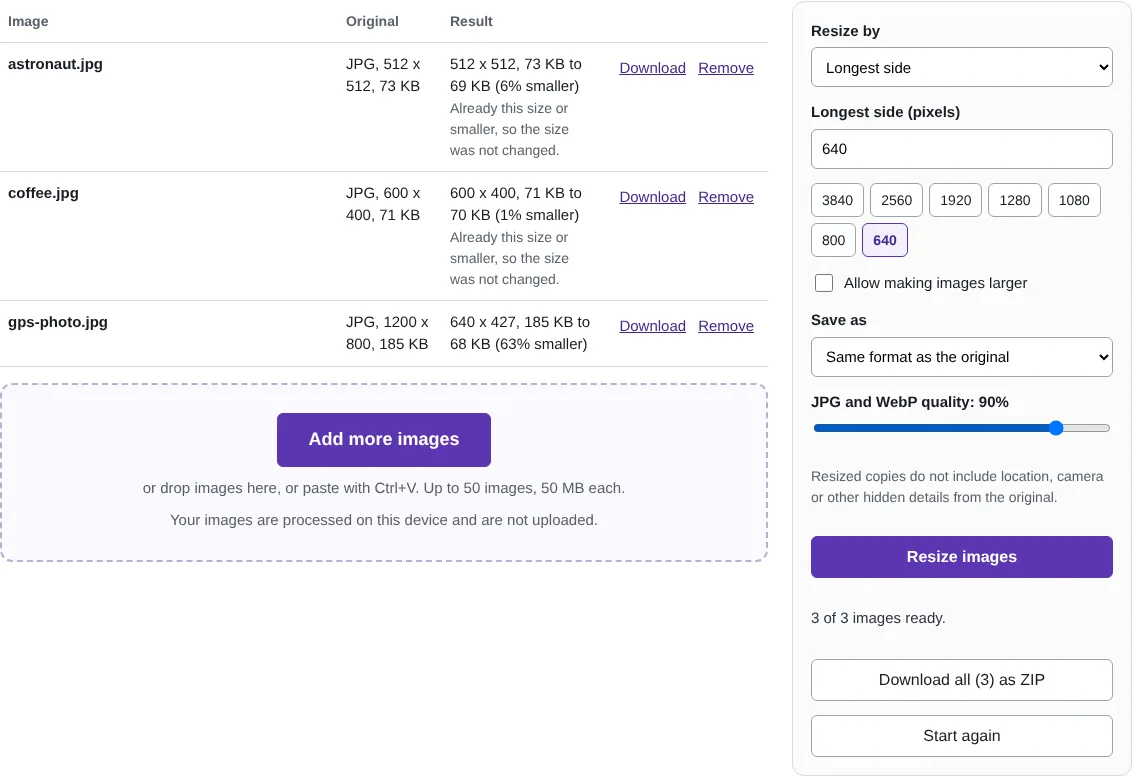
Worked example: three images resized for an email
In this test we resized three images at once to a longest side of 640 pixels: a 1,200 x 800 photo of a coffee cup (185 KB) and two smaller pictures, 512 x 512 and 600 x 400 pixels. The large photo became 640 x 427 pixels and 68 KB, 63% smaller. The two smaller images were already under 640 pixels, so they kept their size, and the list said so.
Download all saved the three files in one ZIP named resized-images.zip. Each new file name includes its new size, for example photo-640x427.jpg for a file called photo.jpg.
Which size to choose
For viewing on a screen, a longest side of 1,920 pixels looks sharp on most monitors, and 1,280 is plenty for email and messages. For a website, use the width your page actually shows the image at, often 800 to 1,600 pixels. For printing, keep the original size: a 10 x 15 cm print at good quality needs about 1,200 x 1,800 pixels.
Longest side is the safest choice for a mixed batch because portrait and landscape images both end up within the same box. Width and Height keep the proportions too. Exact width and height stretches the picture if its shape is different, so crop it first when you need a fixed shape such as a square.
What happens to quality and hidden details
Making an image smaller uses high-quality scaling in steps, which keeps fine detail and avoids jagged edges. JPG and WebP copies are saved at 90% quality by default; you can change this. Images are not enlarged unless you tick Allow making images larger, because enlarging cannot add detail.
The resized copies are new files, so they do not carry the GPS location, camera details or dates stored in the originals. If you only want to remove those details and keep the size, use Remove EXIF and location data, which does not change the picture at all.
Good to know
- Longest side keeps every image in proportion, whether it is portrait or landscape.
- Images are not made larger unless you allow it, so small images stay sharp.
- Resized copies are saved without the original location, camera and date details.
Why your images stay on your device
RedactNinja Image runs in your web browser. When you choose an image, it is read and processed on your own computer, tablet or phone. It is not uploaded to a server, so there is nothing for us to store, look at or delete afterwards. The background remover and face finder use small AI models that your browser downloads from this site the first time you need them; the models come to your image, not the other way round.
You can check this yourself: open your browser's developer tools, select the Network tab and use a tool. Your image does not appear in the requests. The tools load no advertising or analytics code. How to check that nothing is uploaded.
Free, with no sign-up and no watermark
Every tool is free to use without an account. Nothing is added to your images, and there are no daily limits. Very large images depend on your device's memory, so older phones may be slower.
Questions about Resize image
Will resizing reduce quality?
Making an image smaller keeps it sharp because high-quality scaling is used. Making it larger cannot add detail, so it may look soft.
How do I resize a photo for email?
A longest side of 1920 or 1280 pixels is plenty for viewing on a screen and usually makes a much smaller file.
Can I set an exact width and height?
Yes. Choose Exact width and height. If the shape differs from the original, the picture is stretched, so crop it first if you need a different shape.
Are my images uploaded?
No. The tool runs in your browser and processes the image on your device. Nothing is sent to a server.
Is it free?
Yes. There is no account, no watermark and no daily limit.
Related tools
All image tools
Edit
- Remove background
- Resize image
- Crop image
- Rotate image
- Adjust colours
- Add watermark
- Annotate screenshot
- Combine images
Make smaller and convert
- Compress image
- Convert image
- HEIC to JPG
- PNG to JPG
- JPG to PNG
- WebP to JPG
- WebP to PNG
- JPG to WebP
- Favicon and icon maker