
Remove EXIF and location data from a photo
Photos from phones and cameras often carry hidden details: the exact place they were taken, the date, the camera and sometimes your name. See what is there, then save a copy without it.
Your image will be processed on this device.
How to remove EXIF and location data from a photo
- Select or drop one or more photos.
- Check the hidden details listed under each photo. Location is shown first.
- Select Remove hidden details.
- Download the cleaned copies.
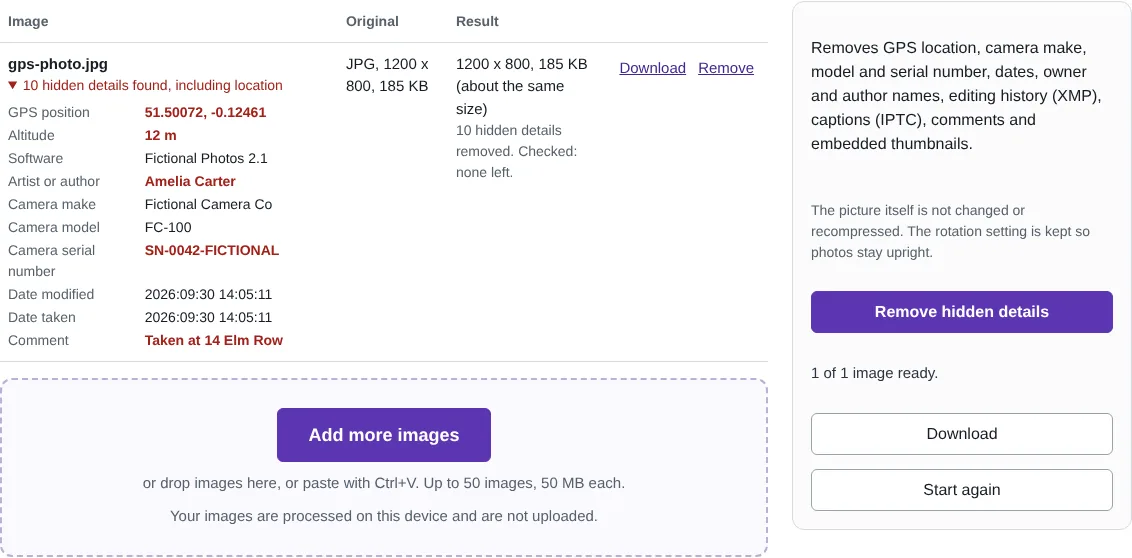
Worked example: a phone-style photo with a location
In this test we made a fictional photo with the kind of details a phone or camera adds: a GPS position in central London with the altitude, the date and time it was taken, a camera make, model and serial number, an author name, the editing software and a comment saying where it was taken. The tool listed all ten, with the location first.
After Remove hidden details, the cleaned copy was checked again and none were left except the rotation setting, so the photo still shows upright. The compressed picture data inside the file was byte for byte the same as the original, so there was no loss of quality, and the file was almost exactly the same size.
What EXIF and other hidden details can reveal
The GPS position is the most sensitive: from a photo taken at home it can give your address to within a few metres. The date and time show when you were there. Camera serial numbers and owner names can link photos you post under different names. Editing apps may add the software used and an editing history (XMP), and news and stock photos often carry captions and contact details (IPTC). Some phones also store a small preview copy of the picture, which can show the photo as it was before you cropped it.
Many large social networks remove these details from the copy they show, but files sent by email, shared through cloud storage links, sent as files in messaging apps, or uploaded to websites and forums often keep them.
How this tool removes details without re-saving the picture
For JPG, PNG and WebP files, the tool rewrites the file without the blocks that hold hidden details and copies the compressed picture data unchanged, so there is no quality loss. JPG files can also carry extra pictures or video after the main image, for example depth maps or motion clips; these are removed too. The tool then reads the new file again and only offers it if nothing is left.
For other formats, such as GIF, BMP or AVIF, it saves a PNG instead, which carries none of the original details. Every other tool on this site, such as Resize and Compress, also saves new files without these details.
Good to know
- JPG, PNG and WebP pictures are not changed or recompressed; only the hidden details are removed.
- The rotation setting is kept so photos still show upright.
- Each cleaned file is checked again, and nothing is saved if any detail is left.
- Other formats are saved as PNG, which carries no details from the original.
Why your images stay on your device
RedactNinja Image runs in your web browser. When you choose an image, it is read and processed on your own computer, tablet or phone. It is not uploaded to a server, so there is nothing for us to store, look at or delete afterwards. The background remover and face finder use small AI models that your browser downloads from this site the first time you need them; the models come to your image, not the other way round.
You can check this yourself: open your browser's developer tools, select the Network tab and use a tool. Your image does not appear in the requests. The tools load no advertising or analytics code. How to check that nothing is uploaded.
Free, with no sign-up and no watermark
Every tool is free to use without an account. Nothing is added to your images, and there are no daily limits. Very large images depend on your device's memory, so older phones may be slower.
Questions about Remove EXIF and location data
What is EXIF data?
Information a camera or phone stores inside a photo: the date and time, camera make and model, settings, and often the GPS position.
Do social media sites remove location data?
Many large sites remove it from the public copy, but email, messaging apps that send files, cloud links and many websites pass the original file on, with its location.
Are my images uploaded?
No. The tool runs in your browser and processes the image on your device. Nothing is sent to a server.
Is it free?
Yes. There is no account, no watermark and no daily limit.
Related tools
All image tools
Edit
- Remove background
- Resize image
- Crop image
- Rotate image
- Adjust colours
- Add watermark
- Annotate screenshot
- Combine images
Make smaller and convert
- Compress image
- Convert image
- HEIC to JPG
- PNG to JPG
- JPG to PNG
- WebP to JPG
- WebP to PNG
- JPG to WebP
- Favicon and icon maker